Cards para disjuntores e falta de luz no Home Assistant
Quando você começa a colocar disjuntores inteligentes na rotina da casa, a automação deixa de ser “legal” e passa a ser infraestrutura. E infraestrutura precisa de duas coisas:
- Controle rápido (ligar/desligar, entender status, ver potência)
- Confiança visual (saber em um olhar se está tudo normal ou se tem algo errado)
Meu problema era simples: eu tinha vários disjuntores e precisava de uma página única no Home Assistant onde eu conseguisse:
- Ver todos os disjuntores na mesma tela
- Saber imediatamente se cada um está OK / com problema
- Ter o estado operacional (on/standby/off) e o controle de energia
- Acompanhar tendências (potência ao longo das últimas horas)
- E, principalmente, ter um card separado que mostrasse quando faltou luz, quantas vezes e por quanto tempo
No fim, eu cheguei em dois cards principais:
- um card de “controle do disjuntor” (status + power + métricas + gráfico)
- um card de “estatísticas de queda de energia” (Today/MTD/YTD/Lifetime com contagem e tempo)
O detalhe interessante é que esse resultado veio de uma mistura de ChatGPT Pro com muita lapidação manual no YAML—porque o “jeito certo” é aquele que se encaixa no seu uso real.
Card 1 — O “cockpit” do disjuntor: controle + leitura rápida
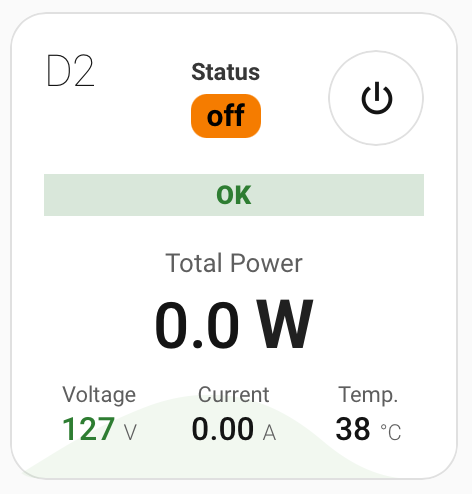
O primeiro card virou meu “painel de comando” por disjuntor.
O que ele mostra (sem poluição visual)
- Nome do disjuntor (ex.: D2)
- Status (um pill “on/off/unknown” com cor)
- Botão power (chip de toggle)
- Um retângulo de saúde (OK/PROBLEM) baseado em um
binary_sensor - Total Power em destaque
- Voltage / Current / Temperature como “resumo de instrumentação”
- Um mini gráfico ao fundo com o histórico recente de potência
A base técnica aqui é a combinação de:
custom:button-card(para grid, custom_fields e layout livre)mini-graph-card(para o histórico compacto dentro do card)mushroom-chips-card(toggle bonito e consistente)
Por que isso funciona bem na prática?
Porque ele te dá três níveis de informação no mesmo componente:
- Nível 1 (instante): “tá tudo OK?” (pill verde/vermelho)
- Nível 2 (controle): “posso desligar/ligar agora?” (chip power)
- Nível 3 (diagnóstico): potência e instrumentação + tendência (gráfico)
Você não precisa entrar em “mais detalhes” para tomar as ações comuns.
Código Card Largo
type: custom:button-card
show_icon: false
show_name: true
name: D2
show_state: false
styles:
  name:
    - font-weight: 200
    - font-size: 22px
    - justify-self: start
    - align-self: start
  card:
    - padding: 16px
    - border-radius: 18px
    - overflow: visible
  grid:
    - grid-template-areas: |
        "n status switch"
        "problem problem problem"
        "power power power"
        "volt cur temp"
    - grid-template-columns: 1fr 1fr 1fr
    - row-gap: 12px
    - column-gap: 12px
    - align-items: center
    - overflow: visible
  custom_fields:
    graph:
      - position: absolute
      - width: 100%
      - left: 0
      - bottom: 0
    problem:
      - justify-self: stretch
      - align-self: center
      - overflow: visible
    status:
      - justify-self: stretch
      - align-self: center
      - overflow: visible
    switch:
      - justify-self: end
      - align-self: center
    power:
      - justify-self: stretch
      - align-self: center
      - overflow: visible
custom_fields:
  graph:
    card:
      type: custom:mini-graph-card
      entities:
        - entity: sensor.d2_test_power
          color: "#a6cf9d"
      line_width: 0
      height: 100
      hours_to_show: 12
      show:
        icon: false
        name: false
        state: false
        legend: false
        labels: false
      card_mod:
        style: |
          ha-card { border-style: none; background: none; }
  status:
    card:
      type: custom:button-card
      show_icon: false
      show_name: true
      show_state: false
      entity: switch.d2_test
      tap_action:
        action: toggle
      hold_action:
        action: more-info
      name: |
        [[[
          const st = states['switch.d2_test']?.state;
          const val = (!st || st === 'unavailable' || st === 'unknown')
            ? 'unknown'
            : (st === 'on' ? 'on' : 'off');

          const bg =
            val === 'off' ? '#f57c00' :
            val === 'on' ? '#2e7d32' :
            'rgba(255,255,255,0.10)';

          const fg =
            val === 'off' ? 'black' :
            val === 'on' ? 'white' :
            'var(--primary-text-color)';

          return `
            <div style="text-align:center;">
              <div style="font-size:12px; opacity:0.85;">Status</div>
              <div style="
                font-size:15px;
                display:inline-block;
                margin-top:4px;
                padding:2px 8px;
                border-radius:8px;
                font-weight:600;
                background:${bg};
                color:${fg};
              ">
                ${val}
              </div>
            </div>
          `;
        ]]]
      styles:
        card:
          - border: 0px
          - border-radius: 10px
          - padding: 6px
          - background: none
          - overflow: visible
          - width: max-content
          - justify-self: start
          - align-self: start
        name:
          - text-align: center
          - font-weight: 600
          - overflow: visible
  problem:
    card:
      type: custom:button-card
      entity: binary_sensor.d2_test_problem
      show_icon: false
      show_name: false
      show_state: false
      styles:
        card:
          - border: 0
          - background: none
          - padding: 0
          - overflow: visible
        grid:
          - grid-template-areas: "\"bar\""
          - grid-template-columns: 1fr
          - justify-items: stretch
          - align-items: stretch
        custom_fields:
          bar:
            - width: 100%
            - justify-self: stretch
            - align-self: stretch
      custom_fields:
        bar: |
          [[[
            const stRaw = states['binary_sensor.d2_test_problem']?.state;
            const badState = (!stRaw || stRaw === 'unavailable' || stRaw === 'unknown');

            // OFF means OK
            const isOk = (!badState && stRaw === 'off');
            const label = badState ? String(stRaw || 'unknown').toUpperCase() : (isOk ? 'OK' : 'PROBLEM');

            const bg = badState
              ? 'rgba(0,0,0,0.06)'
              : isOk
                ? 'rgba(46, 125, 50, 0.18)'
                : 'rgba(211, 47, 47, 0.18)';

            const fg = badState
              ? 'rgba(0,0,0,0.45)'
              : isOk
                ? '#2e7d32'
                : '#d32f2f';

            return `
              <div style="
                width:100%;
                display:block;
                box-sizing:border-box;
                text-align:center;
                padding: 4px 10px;
                font-weight: 800;
                font-size: 13px;
                line-height: 1;
                background: ${bg};
                color: ${fg};
                letter-spacing: 0.3px;
                text-transform: uppercase;
              ">
                ${label}
              </div>
            `;
          ]]]
  switch:
    card:
      type: custom:mushroom-chips-card
      alignment: end
      chips:
        - type: template
          entity: switch.d2_test
          icon: mdi:power
          icon_color: >
            {% if is_state(config.entity, 'on') %} white {% else %}
            var(--secondary-text-color) {% endif %}
          tap_action:
            action: toggle
          hold_action:
            action: more-info
          card_mod:
            style: |
              :host {
                --chip-background: {{ 'var(--primary-color)' if is_state(config.entity,'on') else 'rgba(255,255,255,0.06)' }};
              }
              ha-card {
                --chip-height: 46px;
                --chip-font-size: 16px;
                --mdc-icon-size: 24px;
                border-radius: 28px !important;
              }
  power:
    card:
      type: custom:button-card
      show_icon: false
      show_name: true
      show_state: false
      entity: sensor.d2_test_power
      name: |
        [[[
          const st = states['sensor.d2_test_power']?.state;
          const bad = (!st || st === 'unavailable' || st === 'unknown');
          const p = bad ? null : parseFloat(String(st).replace(',', '.'));
          const val = (p === null || Number.isNaN(p)) ? 'N/A' : p.toFixed(1);

          return `
            <div style="text-align:center;">
              <div style="font-size:13px; color: var(--secondary-text-color); margin-bottom:6px;">
                Total Power
              </div>
              <div style="font-size:32px; font-weight:500; letter-spacing:-0.6px; line-height:1;">
                ${val} <span style="font-size:34px; font-weight:700; opacity:0.95;">W</span>
              </div>
            </div>
          `;
        ]]]
      tap_action:
        action: more-info
      styles:
        card:
          - border: 0px
          - background: none
          - padding: 4px 0 0 0
          - overflow: visible
  volt:
    card:
      type: custom:button-card
      show_icon: false
      show_name: true
      show_state: false
      entity: sensor.d2_test_voltage
      name: |
        [[[
          const st = states['sensor.d2_test_voltage']?.state;
          const bad = (!st || st === 'unavailable' || st === 'unknown');
          const v = bad ? null : parseFloat(String(st).replace(',', '.'));
          const val = (v === null || Number.isNaN(v)) ? '—' : String(Math.round(v));

          let col = 'var(--secondary-text-color)';
          if (!bad && v !== null && Number.isFinite(v)) {
            if (v >= 110 && v <= 130) col = '#2e7d32';
            else if ((v > 130 && v <= 135) || (v >= 100 && v < 110)) col = '#f57c00';
            else col = '#d32f2f';
          }

          return `
            <div style="text-align:center;">
              <div style="font-size:11px; color: var(--secondary-text-color); margin-bottom:3px;">
                Voltage
              </div>
              <div style="font-size:16px; font-weight:500; line-height:1; color:${col};">
                ${val}
                <span style="font-size:11px; font-weight:300; color: var(--secondary-text-color);">V</span>
              </div>
            </div>
          `;
        ]]]
      tap_action:
        action: more-info
      styles:
        card:
          - border: 0px
          - background: none
          - padding: 0px
          - overflow: visible
  cur:
    card:
      type: custom:button-card
      show_icon: false
      show_name: true
      show_state: false
      entity: sensor.d2_test_current
      name: |
        [[[
          const st = states['sensor.d2_test_current']?.state;
          const bad = (!st || st === 'unavailable' || st === 'unknown');
          const a = bad ? null : parseFloat(String(st).replace(',', '.'));
          const val = (a === null || Number.isNaN(a)) ? '—' : a.toFixed(2);

          return `
            <div style="text-align:center;">
              <div style="font-size:11px; color: var(--secondary-text-color); margin-bottom:3px;">
                Current
              </div>
              <div style="font-size:16px; font-weight:500; line-height:1;">
                ${val}
                <span style="font-size:11px; font-weight:300; color: var(--secondary-text-color);">A</span>
              </div>
            </div>
          `;
        ]]]
      tap_action:
        action: more-info
      styles:
        card:
          - border: 0px
          - background: none
          - padding: 0px
          - overflow: visible
  temp:
    card:
      type: custom:button-card
      show_icon: false
      show_name: true
      show_state: false
      entity: sensor.d2_test_temperature
      name: |
        [[[
          const st = states['sensor.d2_test_temperature']?.state;
          const bad = (!st || st === 'unavailable' || st === 'unknown');
          const t = bad ? null : parseFloat(String(st).replace(',', '.'));
          const val = (t === null || Number.isNaN(t)) ? '—' : String(Math.round(t));

          return `
            <div style="text-align:center;">
              <div style="font-size:11px; color: var(--secondary-text-color); margin-bottom:3px;">
                Temp.
              </div>
              <div style="font-size:16px; font-weight:500; line-height:1;">
                ${val}
                <span style="font-size:11px; font-weight:300; color: var(--secondary-text-color);">°C</span>
              </div>
            </div>
          `;
        ]]]
      tap_action:
        action: more-info
      styles:
        card:
          - border: 0px
          - background: none
          - padding: 0px
          - overflow: visible
grid_options:
  columns: 6
  rows: auto
Código Card Fino

type: custom:button-card
show_icon: false
show_name: true
name: D2
show_state: false
styles:
  name:
    - font-weight: 200
    - font-size: 22px
  card:
    - padding: 16px
    - border-radius: 18px
    - overflow: visible
    - justify-self: stretch
    - align-self: center
    - overflow: visible
  grid:
    - grid-template-areas: |
        "n"
        "status"
        "switch"
        "problem"
        "power"
        "volt "
        "cur"
        "temp"
    - grid-template-columns: 1fr
    - row-gap: 12px
    - align-items: center
    - overflow: visible
  custom_fields:
    graph:
      - position: absolute
      - width: 100%
      - left: 0
      - bottom: 0
custom_fields:
  graph:
    card:
      type: custom:mini-graph-card
      entities:
        - entity: sensor.d2_test_power
          color: "#a6cf9d"
      line_width: 0
      height: 100
      hours_to_show: 12
      show:
        icon: false
        name: false
        state: false
        legend: false
        labels: false
      card_mod:
        style: |
          ha-card { border-style: none; background: none; }
  status:
    card:
      type: custom:button-card
      show_icon: false
      show_name: true
      show_state: false
      entity: switch.d2_test
      tap_action:
        action: toggle
      hold_action:
        action: more-info
      name: |
        [[[
          const st = states['switch.d2_test']?.state;
          const val = (!st || st === 'unavailable' || st === 'unknown')
            ? 'unknown'
            : (st === 'on' ? 'on' : 'off');

          const bg =
            val === 'off' ? '#f57c00' :
            val === 'on' ? '#2e7d32' :
            'rgba(255,255,255,0.10)';

          const fg =
            val === 'off' ? 'black' :
            val === 'on' ? 'white' :
            'var(--primary-text-color)';

          return `
            <div style="text-align:center;">
              <div style="font-size:12px; opacity:0.85;">Status</div>
              <div style="
                font-size:15px;
                display:inline-block;
                margin-top:4px;
                padding:2px 8px;
                border-radius:8px;
                font-weight:600;
                background:${bg};
                color:${fg};
              ">
                ${val}
              </div>
            </div>
          `;
        ]]]
      styles:
        card:
          - border: 0px
          - justify-self: start
          - align-self: start
        name:
          - text-align: center
          - font-weight: 600
          - overflow: visible
  problem:
    card:
      type: custom:button-card
      entity: binary_sensor.d2_test_problem
      show_icon: false
      show_name: false
      show_state: false
      styles:
        card:
          - border: 0
          - background: none
          - padding: 0
          - overflow: visible
        grid:
          - grid-template-areas: "\"bar\""
          - grid-template-columns: 1fr
          - justify-items: stretch
          - align-items: stretch
        custom_fields:
          bar:
            - width: 100%
            - justify-self: stretch
            - align-self: stretch
      custom_fields:
        bar: |
          [[[
            const stRaw = states['binary_sensor.d2_test_problem']?.state;
            const badState = (!stRaw || stRaw === 'unavailable' || stRaw === 'unknown');

            // OFF means OK
            const isOk = (!badState && stRaw === 'off');
            const label = badState ? String(stRaw || 'unknown').toUpperCase() : (isOk ? 'OK' : 'PROBLEM');

            const bg = badState
              ? 'rgba(0,0,0,0.06)'
              : isOk
                ? 'rgba(46, 125, 50, 0.18)'
                : 'rgba(211, 47, 47, 0.18)';

            const fg = badState
              ? 'rgba(0,0,0,0.45)'
              : isOk
                ? '#2e7d32'
                : '#d32f2f';

            return `
              <div style="
                width:100%;
                display:block;
                box-sizing:border-box;
                text-align:center;
                padding: 4px 10px;
                font-weight: 800;
                font-size: 13px;
                line-height: 1;
                background: ${bg};
                color: ${fg};
                letter-spacing: 0.3px;
                text-transform: uppercase;
              ">
                ${label}
              </div>
            `;
          ]]]
  switch:
    card:
      type: custom:mushroom-chips-card
      alignment: center
      chips:
        - type: template
          entity: switch.d2_test
          icon: mdi:power
          icon_color: >
            {% if is_state(config.entity, 'on') %} white {% else %}
            var(--secondary-text-color) {% endif %}
          tap_action:
            action: toggle
          hold_action:
            action: more-info
          card_mod:
            style: |
              :host {
                --chip-background: {{ 'var(--primary-color)' if is_state(config.entity,'on') else 'rgba(255,255,255,0.06)' }};
              }
              ha-card {
                --chip-height: 46px;
                --chip-font-size: 16px;
                --mdc-icon-size: 24px;
                border-radius: 28px !important;
              }
  power:
    card:
      type: custom:button-card
      show_icon: false
      show_name: true
      show_state: false
      entity: sensor.d2_test_power
      name: |
        [[[
          const st = states['sensor.d2_test_power']?.state;
          const bad = (!st || st === 'unavailable' || st === 'unknown');
          const p = bad ? null : parseFloat(String(st).replace(',', '.'));
          const val = (p === null || Number.isNaN(p)) ? 'N/A' : p.toFixed(1);

          return `
            <div style="text-align:center;">
              <div style="font-size:13px; color: var(--secondary-text-color); margin-bottom:6px;">
                Total Power
              </div>
              <div style="font-size:32px; font-weight:500; letter-spacing:-0.6px; line-height:1;">
                ${val} <span style="font-size:34px; font-weight:700; opacity:0.95;">W</span>
              </div>
            </div>
          `;
        ]]]
      tap_action:
        action: more-info
      styles:
        card:
          - border: 0px
          - background: none
          - padding: 4px 0 0 0
          - overflow: visible
  volt:
    card:
      type: custom:button-card
      show_icon: false
      show_name: true
      show_state: false
      entity: sensor.d2_test_voltage
      name: |
        [[[
          const st = states['sensor.d2_test_voltage']?.state;
          const bad = (!st || st === 'unavailable' || st === 'unknown');
          const v = bad ? null : parseFloat(String(st).replace(',', '.'));
          const val = (v === null || Number.isNaN(v)) ? '—' : String(Math.round(v));

          let col = 'var(--secondary-text-color)';
          if (!bad && v !== null && Number.isFinite(v)) {
            if (v >= 110 && v <= 130) col = '#2e7d32';
            else if ((v > 130 && v <= 135) || (v >= 100 && v < 110)) col = '#f57c00';
            else col = '#d32f2f';
          }

          return `
            <div style="text-align:center;">
              <div style="font-size:11px; color: var(--secondary-text-color); margin-bottom:3px;">
                Voltage
              </div>
              <div style="font-size:16px; font-weight:500; line-height:1; color:${col};">
                ${val}
                <span style="font-size:11px; font-weight:300; color: var(--secondary-text-color);">V</span>
              </div>
            </div>
          `;
        ]]]
      tap_action:
        action: more-info
      styles:
        card:
          - border: 0px
          - background: none
          - padding: 0px
          - overflow: visible
  cur:
    card:
      type: custom:button-card
      show_icon: false
      show_name: true
      show_state: false
      entity: sensor.d2_test_current
      name: |
        [[[
          const st = states['sensor.d2_test_current']?.state;
          const bad = (!st || st === 'unavailable' || st === 'unknown');
          const a = bad ? null : parseFloat(String(st).replace(',', '.'));
          const val = (a === null || Number.isNaN(a)) ? '—' : a.toFixed(2);

          return `
            <div style="text-align:center;">
              <div style="font-size:11px; color: var(--secondary-text-color); margin-bottom:3px;">
                Current
              </div>
              <div style="font-size:16px; font-weight:500; line-height:1;">
                ${val}
                <span style="font-size:11px; font-weight:300; color: var(--secondary-text-color);">A</span>
              </div>
            </div>
          `;
        ]]]
      tap_action:
        action: more-info
      styles:
        card:
          - border: 0px
          - background: none
          - padding: 0px
          - overflow: visible
  temp:
    card:
      type: custom:button-card
      show_icon: false
      show_name: true
      show_state: false
      entity: sensor.d2_test_temperature
      name: |
        [[[
          const st = states['sensor.d2_test_temperature']?.state;
          const bad = (!st || st === 'unavailable' || st === 'unknown');
          const t = bad ? null : parseFloat(String(st).replace(',', '.'));
          const val = (t === null || Number.isNaN(t)) ? '—' : String(Math.round(t));

          return `
            <div style="text-align:center;">
              <div style="font-size:11px; color: var(--secondary-text-color); margin-bottom:3px;">
                Temp.
              </div>
              <div style="font-size:16px; font-weight:500; line-height:1;">
                ${val}
                <span style="font-size:11px; font-weight:300; color: var(--secondary-text-color);">°C</span>
              </div>
            </div>
          `;
        ]]]
      tap_action:
        action: more-info
      styles:
        card:
          - border: 0px
          - background: none
          - padding: 0px
          - overflow: visible
grid_options:
  columns: 4
  rows: auto
Card 2 — Outage stats: quantas vezes faltou luz e por quanto tempo
O segundo card nasceu de uma dor bem real:
às vezes a energia “some e volta” rápido, e você só percebe depois quando algum equipamento reinicia ou um log acusa falha.
Então eu quis um card que respondesse, de forma objetiva:
- Faltou luz hoje? Quantas vezes? Quanto tempo?
- E no mês, no ano, e no acumulado total?
A ideia foi: detectar “queda” com base na voltagem (A/B/C) e gerar sensores de:
count(quantas ocorrências)time(duração total)
Depois, no card, exibir em colunas “Today / MTD / YTD / Lifetime” com Count e Time.
Esse card resolve o que eu chamo de “telemetria da realidade”: a casa está estável mesmo quando você não está olhando?

type: custom:button-card
entity: binary_sensor.d01_power_outage
show_icon: false
show_name: false
show_state: false
tap_action:
  action: none
hold_action:
  action: more-info
  entity: sensor.d01_voltage_a
styles:
  card:
    - border-radius: 16px
    - padding: 12px
  grid:
    - grid-template-areas: "\"left right\""
    - grid-template-columns: 1fr 1.35fr
    - column-gap: 12px
    - align-items: start
custom_fields:
  left: |
    [[[
      const st = entity?.state;
      const outage = (st === 'on');
      const ok = (st === 'off');

      const icon = outage ? 'mdi:flash-off' : 'mdi:flash';
      const iconColor = outage ? '#d32f2f' : ok ? '#2e7d32' : 'rgba(0,0,0,0.35)';
      const bg = outage ? 'rgba(211, 47, 47, 0.18)' : ok ? 'rgba(46, 125, 50, 0.18)' : 'rgba(0,0,0,0.08)';
      const fg = outage ? '#d32f2f' : ok ? '#2e7d32' : 'rgba(0,0,0,0.45)';
      const label = outage ? 'Outage' : ok ? 'Power OK' : 'Unknown';

      return `
        <div
          onclick="this.dispatchEvent(new CustomEvent('hass-more-info', { composed: true, bubbles: true, detail: { entityId: 'binary_sensor.d01_power_outage' } }))"
          style="padding-top:10px; display:flex; flex-direction:column; gap:8px; align-items:center; cursor:pointer;"
        >
          <ha-icon icon="${icon}" style="width:28px; height:28px; color:${iconColor};"></ha-icon>
          <div style="padding-top:10px; font-size:18px; font-weight:800; line-height:1.1;">D01 Power</div>
          <span style="
            display:inline-block; padding:4px 10px; border-radius:10px;
            font-weight:700; font-size:11px; letter-spacing:0.2px;
            background:${bg}; color:${fg};
          ">${label}</span>
          <div style="padding-top:10px; font-size:11px; color:var(--secondary-text-color); opacity:0.85;">
            Based on voltage (A/B/C)
          </div>
        </div>
      `;
    ]]]
  right: |
    [[[
      const num = (eid) => {
        const s = states[eid]?.state;
        if (!s || s === 'unavailable' || s === 'unknown') return null;
        const n = parseFloat(String(s).replace(',', '.'));
        return Number.isFinite(n) ? n : null;
      };

      const hoursToMin = (h) => (h === null ? null : Math.round(h * 60));
      const fmtMin = (m) => (m === null ? '—' : `${m} min`);
      const fmtCnt = (c) => (c === null ? '—' : `${Math.round(c)}x`);

      const rows = [
        { label: 'Today',    t: 'sensor.d01_outage_time_today',    c: 'sensor.d01_outage_count_today' },
        { label: 'MTD',      t: 'sensor.d01_outage_time_mtd',      c: 'sensor.d01_outage_count_mtd' },
        { label: 'YTD',      t: 'sensor.d01_outage_time_ytd',      c: 'sensor.d01_outage_count_ytd' },
        { label: 'Lifetime', t: 'sensor.d01_outage_time_lifetime', c: 'sensor.d01_outage_count_lifetime' },
      ];

      const moreInfo = (eid) => `
        this.dispatchEvent(new CustomEvent('hass-more-info', {
          composed: true, bubbles: true, detail: { entityId: '${eid}' }
        }));
        event.stopPropagation();
      `;

      const header = `
        <div style="display:flex; justify-content:space-between; gap:10px; margin-bottom:6px;">
          <div style="font-size:11px; opacity:0.7;">Period</div>
          <div style="display:flex; gap:10px;">
            <div style="font-size:11px; opacity:0.7; width:56px; text-align:right;">Count</div>
            <div style="font-size:11px; opacity:0.7; width:78px; text-align:right;">Time</div>
          </div>
        </div>
      `;

      const body = rows.map(r => {
        const c = num(r.c);
        const h = num(r.t);
        const m = hoursToMin(h);

        return `
          <div style="display:flex; justify-content:space-between; gap:10px; padding:6px 0;">
            <div style="font-size:12px; opacity:0.8;">${r.label}</div>
            <div style="display:flex; gap:10px; align-items:baseline;">

              <div
                onclick="${moreInfo(r.c)}"
                style="
                  width:56px; text-align:right; font-size:14px; font-weight:800;
                  cursor:pointer; border-radius:6px; padding:2px 4px;
                  transition: background 0.15s;
                "
                onmouseenter="this.style.background='rgba(var(--rgb-primary-color, 33,150,243),0.12)'"
                onmouseleave="this.style.background='transparent'"
              >${fmtCnt(c)}</div>

              <div
                onclick="${moreInfo(r.t)}"
                style="
                  width:78px; text-align:right; font-size:14px; font-weight:800;
                  cursor:pointer; border-radius:6px; padding:2px 4px;
                  transition: background 0.15s;
                "
                onmouseenter="this.style.background='rgba(var(--rgb-primary-color, 33,150,243),0.12)'"
                onmouseleave="this.style.background='transparent'"
              >${fmtMin(m)}</div>

            </div>
          </div>
        `;
      }).join('');

      return `
        <div style="display:flex; flex-direction:column;">
          <div style="font-size:12px; opacity:0.7; letter-spacing:0.3px; text-align:right;">
            Outage stats
          </div>
          <div style="margin-top:8px;">
            ${header}
            ${body}
          </div>
        </div>
      `;
    ]]]